Saltar al contenido
MisLibrosTexto
Ad
Inglés – Octavo Básico | Student’s Book MINEDUC – Descargar PDF · 2024
Libro de Inglés 8

MINEDUC

40/82

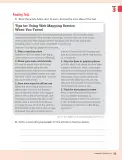
Tips for Using Web Mapping Service When You Travel

📄 ejercicios ingles 🎓 otro · 8° BASICA Chile 🇨🇱 CL 🗣 Español
Página 40
40 de 82
Página 40 de Inglés – Octavo Básico | Student’s Book MINEDUC – Descargar PDF · 2024
Anterior Página 40 / 82 Siguiente

Respuesta rápida

  1. Main idea: web mapping services make traveling easier with useful tech tools. 2. Concluding paragraph: web mapping services transform travel by helping plan, share, save, avoid crowds, and discover places.
📚 exercise ingles ⭐⭐ Dificultad 2/5 ⏱ 8 min lectura

Solución — Página 40

Inglés – Octavo Básico | Student’s Book MINEDUC – Descargar PDF · 2024

1
Ejercicio 1

Read the article below and, in pairs, discuss the main idea of the text.

  1. Identifico el tema central: el texto trata sobre cómo usar un servicio de mapas web (como Google Maps) para viajar mejor.
  2. Reconozco la estructura: una introducción que presenta el beneficio de la tecnología al viajar y cinco consejos numerados.
  3. Sintetizo la idea principal: las aplicaciones de mapas web ofrecen herramientas tecnológicas que hacen los viajes más fáciles, eficientes y agradables.
Respuesta

The main idea is that web mapping services provide useful technological tools that make traveling easier, more efficient, and more enjoyable.

2
Ejercicio 2

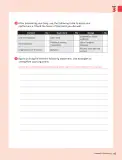
Write a concluding paragraph for the article on the lines below.

  1. Retomo la idea principal: los servicios de mapas web son aliados del viajero.
  2. Resumo los cinco consejos: planificar la ruta, compartirla, guardar mapas sin conexión, evitar horas de mayor afluencia y encontrar los mejores lugares.
  3. Cierro con una recomendación o reflexión final que invite al lector a usar estas herramientas.
Respuesta

In conclusion, web mapping services are powerful tools that can transform the way we travel. By planning routes, sharing them with friends, saving maps for offline use, avoiding busy times, and discovering top-rated places, travelers can enjoy smoother and more memorable trips. Next time you plan an adventure, let technology guide the way.

Contenido de la página

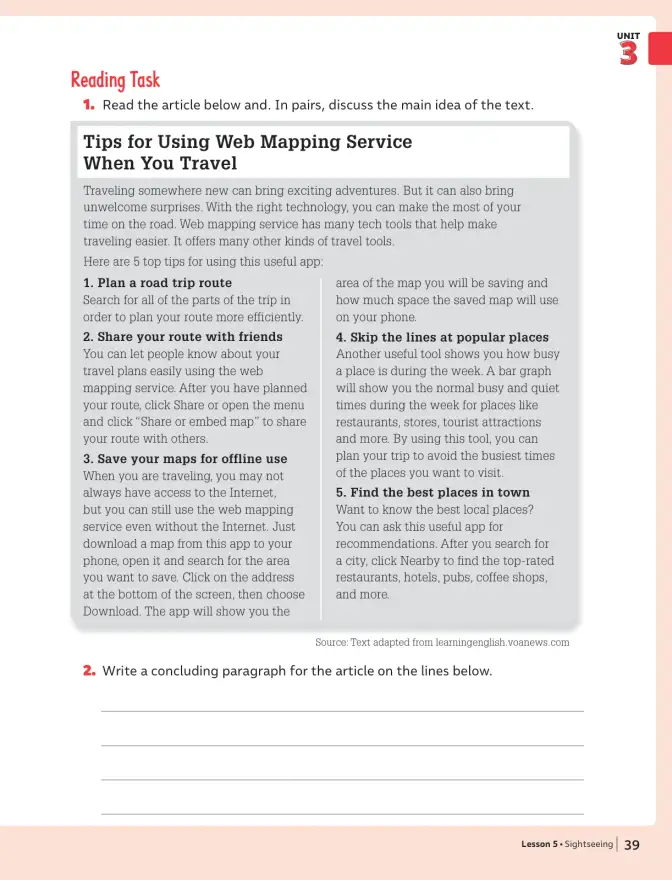
Reading Task

  1. Read the article below and, in pairs, discuss the main idea of the text.

Tips for Using Web Mapping Service When You Travel

Traveling somewhere new can bring exciting adventures. But it can also bring unwelcome surprises. With the right technology, you can make the most of your time on the road. Web mapping service has many tech tools that help make traveling easier. It offers many other kinds of travel tools.

Here are 5 top tips for using this useful app:

  1. Plan a road trip route Search for all of the parts of the trip in order to plan your route more efficiently.

  2. Share your route with friends You can let people know about your travel plans easily using the web mapping service. After you have planned your route, click Share or open the menu and click "Share or embed map" to share your route with others.

  3. Save your maps for offline use When you are traveling, you may not always have access to the Internet, but you can still use the web mapping service even without the Internet. Just download a map from this app to your phone, open it and search for the area you want to save. Click on the address at the bottom of the screen, then choose Download. The app will show you the area of the map you will be saving and how much space the saved map will use on your phone.

  4. Skip the lines at popular places Another useful tool shows you how busy a place is during the week. A bar graph will show you the normal busy and quiet times during the week for places like restaurants, stores, tourist attractions and more. By using this tool, you can plan your trip to avoid the busiest times of the places you want to visit.

  5. Find the best places in town Want to know the best local places? You can ask this useful app for recommendations. After you search for a city, click Nearby to find the top-rated restaurants, hotels, pubs, coffee shops, and more.

Source: Text adapted from learningenglish.voanews.com

  1. Write a concluding paragraph for the article on the lines below.

Glosario (5)

web mapping service
servicio de mapas en línea
road trip
viaje por carretera
offline
sin conexión a internet
bar graph
gráfico de barras
top-rated
mejor valorado

Preguntas para practicar

What is the main idea of the text?

The main idea is that web mapping services provide useful technological tools that make traveling easier, more efficient, and more enjoyable.

Write a concluding paragraph for the article.

In conclusion, web mapping services are powerful tools that can transform the way we travel. By planning routes, sharing them with friends, saving maps for offline use, avoiding busy times, and discovering top-rated places, travelers can enjoy smoother and more memorable trips. Next time you plan an adventure, let technology guide the way.

Temas y conceptos clave

TravelTechnologyWeb mapping servicesWeb mapping serviceOffline mapsRoute planningBar graphRecommendations

Fuentes y referencias

  • learningenglish.voanews.com
¿Te fue útil esta página?

Preguntas que la gente también hace

¿Cómo puedo usar mapas sin conexión a internet?
Consulta la solución completa arriba o explora el libro entero para temas relacionados.
¿Qué herramientas ofrecen las aplicaciones de mapas para viajar?
Consulta la solución completa arriba o explora el libro entero para temas relacionados.
¿Cómo escribir un párrafo de conclusión en inglés?
Consulta la solución completa arriba o explora el libro entero para temas relacionados.
📌 Antes de leer esto
  • • Vocabulario básico de viajes y tecnología
  • • Comprensión de textos informativos en inglés
  • • Estructura de un párrafo
Siguiente tema sugerido
Writing an informative paragraph about travel apps
📝 Transcripción de la página (texto seleccionable) 2072 caracteres

Reading Task

  1. Read the article below and. In pairs, discuss the main idea of the text.

Tips for Using Web Mapping Service When You Travel

Traveling somewhere new can bring exciting adventures. But it can also bring unwelcome surprises. With the right technology, you can make the most of your time on the road. Web mapping service has many tech tools that help make traveling easier. It offers many other kinds of travel tools.

Here are 5 top tips for using this useful app:

1. Plan a road trip route

Search for all of the parts of the trip in order to plan your route more efficiently.

area of the map you will be saving and how much space the saved map will use on your phone.

2. Share your route with friends

You can let people know about your travel plans easily using the web mapping service. After you have planned your route, click Share or open the menu and click "Share or embed map”to share your route with others.

3. Save your maps for offline use

When you are traveling, you may not always have access to the Internet,but you can still use the web mapping service even without the Internet. Just download a map from this app to your phone, open it and search for the area you want to save. Click on the address at the bottom of the screen, then choose Download. The app will show you the

  1. Skip the lines at popular places Another useful tool shows you how busy a place is during the week. A bar graph will show you the normal busy and quiet times during the week for places like restaurants, stores, tourist attractions and more. By using this tool, you can plan your trip to avoid the busiest times of the places you want to visit.

5. Find the best places in town

Want to know the best local places?You can ask this useful app for recommendations. After you search for a city, click Nearby to find the top-rated restaurants, hotels, pubs, coffee shops,and more.

Source: Text adapted from learningenglish.voanews.com

2. Write a concluding paragraph for the article on the lines below.

UNIT 3

Lesson 5. Sightseeing

39

Ad

Otros libros recomendados

Ver todos →
Ad

Usamos cookies propias y de terceros para personalizar contenido, mostrar publicidad y analizar el tráfico. Las cookies necesarias siempre están activas.